

Apex(Terraform)로 API Gateway 구성하기 #2
이 글은 Apex(Terraform)로 API Gateway 구성하기 #1에서 이어진 글이다.
API Gateway 로깅
API Gateway가 안되는 이유를 보려면 API Gateway에서 발생한 오류를 로그로 남겨서 봐야 한다. API Gateway에는 오류를 보는 기능이 없으므로 확인하는 CloudWatch에 오류를 남길 수 있도록 설정해야 한다.
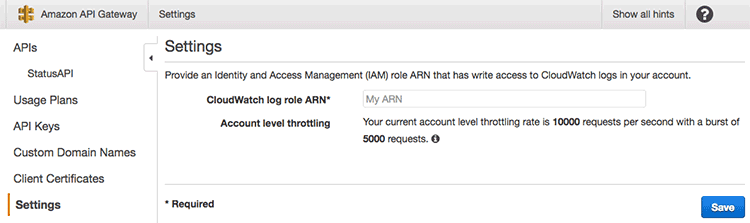
API Gateway에서는 리전 내 전체 설정에서 CloudWatch에 로그를 남길 수 있는 권한이 있는 role의 ARN을 설정해 놓고 각 API의 리소스나 메서드에서 이 role을 사용해서 로깅을 키거나 끌 수 있다. 이 설정은 특정 Lambda에 종속 된 것이 아니므로 별도의 파일 cloudwatch.tf로 분리했다.
 1// infrastructure/cloudwatch.tf
 2
 3// cloudwatch를 사용할 policy
 4data "aws_iam_policy_document" "allow_log_to_cloudwatch" {
 5  statement {
 6    actions = [
 7      "logs:CreateLogGroup",
 8      "logs:CreateLogStream",
 9      "logs:DescribeLogGroups",
10      "logs:DescribeLogStreams",
11      "logs:PutLogEvents",
12      "logs:GetLogEvents",
13      "logs:FilterLogEvents"
14    ]
15    resources = [
16      "*",
17    ]
18  }
19}
20
21resource "aws_iam_role_policy" "allow_log_to_cloudwatch" {
22  name   = "allow_log_to_cloudwatch"
23  role = "${aws_iam_role.api_gateway_cloudwatch.id}"
24  policy = "${data.aws_iam_policy_document.allow_log_to_cloudwatch.json}"
25}
26
27// cloudwatch를 사용할 role
28data "aws_iam_policy_document" "allow_log_to_cloudwatch_from_apigateway" {
29  statement {
30    actions = ["sts:AssumeRole"]
31
32    principals {
33      type        = "Service"
34      identifiers = ["apigateway.amazonaws.com"]
35    }
36  }
37}
38
39resource "aws_iam_role" "api_gateway_cloudwatch" {
40  name = "api_gateway_cloudwatch"
41  assume_role_policy = "${data.aws_iam_policy_document.allow_log_to_cloudwatch_from_apigateway.json}"
42}
43
44// 로깅을 위한 CloudWatch 설정
45resource "aws_api_gateway_account" "api_gateway_account" {
46  cloudwatch_role_arn = "${aws_iam_role.api_gateway_cloudwatch.arn}"
47}
여기서는 IAM에서 policy를 하나 만들고 role을 하나 만들어서 policy에 연결한 후에 API Gateway에 설정한 것이다. aws_iam_policy_document.allow_log_to_cloudwatch에서 정책 규칙을 정의해서 aws_iam_role_policy로 새로운 policy를 만들고 aws_iam_policy_document.allow_log_to_cloudwatch_from_apigateway에서 role의 규칙을 만든 후 aws_iam_role에서 role을 만들고 이 role을 policy와 연결했다. 그리고 이렇게 생성한 role의 ARN은 aws_api_gateway_account에서 설정했다.
이를 적용해보자.
 1$ apex infra plan
 2
 3+ aws_api_gateway_account.api_gateway_account
 4    cloudwatch_role_arn: "${aws_iam_role.api_gateway_cloudwatch.arn}"
 5    throttle_settings.#: "<computed>"
 6
 7-/+ aws_api_gateway_deployment.status_api_test
 8    created_date:      "2017-05-07T17:22:22Z" => "<computed>"
 9    description:       "Deployed at 2017-05-07T17:22:22Z" => "Deployed at 2017-05-07T17:36:36Z"
10    execution_arn:     "arn:aws:execute-api:ap-northeast-1:410000000000:1w03z7dzmi/test" => "<computed>"
11    invoke_url:        "https://1w03z7dzmi.execute-api.ap-northeast-1.amazonaws.com/test" => "<computed>"
12    rest_api_id:       "1w03z7dzmi" => "1w03z7dzmi"
13    stage_description: "2017-05-07T17:22:22Z" => "2017-05-07T17:36:36Z" (forces new resource)
14    stage_name:        "test" => "test"
15
16+ aws_iam_role.api_gateway_cloudwatch
17    arn:                "<computed>"
18    assume_role_policy: "{\n  \"Version\": \"2012-10-17\",\n  \"Statement\": [\n    {\n      \"Sid\": \"\",\n      \"Effect\": \"Allow\",\n      \"Action\": \"sts:AssumeRole\",\n      \"Principal\": {\n        \"Service\": \"apigateway.amazonaws.com\"\n      }\n    }\n  ]\n}"
19    create_date:        "<computed>"
20    name:               "api_gateway_cloudwatch"
21    path:               "/"
22    unique_id:          "<computed>"
23
24+ aws_iam_role_policy.allow_log_to_cloudwatch
25    name:   "allow_log_to_cloudwatch"
26    policy: "{\n  \"Version\": \"2012-10-17\",\n  \"Statement\": [\n    {\n      \"Sid\": \"\",\n      \"Effect\": \"Allow\",\n      \"Action\": [\n        \"logs:PutLogEvents\",\n        \"logs:GetLogEvents\",\n        \"logs:FilterLogEvents\",\n        \"logs:DescribeLogStreams\",\n        \"logs:DescribeLogGroups\",\n        \"logs:CreateLogStream\",\n        \"logs:CreateLogGroup\"\n      ],\n      \"Resource\": \"*\"\n    }\n  ]\n}"
27    role:   "${aws_iam_role.api_gateway_cloudwatch.id}"
28
29-/+ aws_lambda_permission.status_api_resource_check_post
30    action:        "lambda:InvokeFunction" => "lambda:InvokeFunction"
31    function_name: "github-status_github-status" => "github-status_github-status"
32    principal:     "apigateway.amazonaws.com" => "apigateway.amazonaws.com"
33    source_arn:    "arn:aws:execute-api:ap-northeast-1:410000000000:1w03z7dzmi/test/POST/check" => "${aws_api_gateway_deployment.status_api_test.execution_arn}/${aws_api_gateway_integration.status_api_resource_check_post.integration_http_method}${aws_api_gateway_resource.status_api_resource_check.path}" (forces new resource)
34    statement_id:  "AllowInvokeFromAPIGateway" => "AllowInvokeFromAPIGateway"
35
36
37Plan: 5 to add, 0 to change, 2 to destroy.
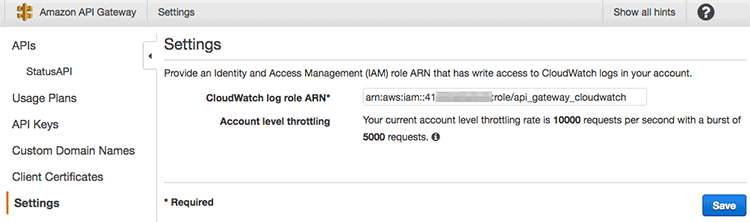
API Gateway의 설정 화면에 들어가면 ARN이 잘 설정된 것을 볼 수 있다.
이제 API에 로깅을 활성화 해야 한다.
 1// infrastructure/github-status.tf
 2
 3// API 메서드 설정
 4resource "aws_api_gateway_method_settings" "status_api_resource_check_post" {
 5  rest_api_id = "${aws_api_gateway_rest_api.status_api.id}"
 6  stage_name  = "${aws_api_gateway_deployment.status_api_test.stage_name}"
 7  method_path = "${aws_api_gateway_resource.status_api_resource_check.path_part}/${aws_api_gateway_method.status_api_resource_check_post.http_method}"
 8
 9  settings {
10    metrics_enabled = true
11    logging_level = "INFO"
12  }
13}
이는 aws_api_gateway_method_settings를 사용하는데 메서드 레벨에서 로깅 등을 활성화할 수 있다. 웹 콘솔에서는 스테이지 단위에서 설정을 한 후 다른 리소스나 메서드에서는 이 설정을 상속받는데 Terraform에서는 그런 방법을 못 찾았고 위처럼 스테이지와 메서드를 지정하고 로깅 등을 설정할 수 있다.
 1$ apex infra plan
 2
 3-/+ aws_api_gateway_deployment.status_api_test
 4    created_date:      "2017-05-07T17:42:26Z" => "<computed>"
 5    description:       "Deployed at 2017-05-07T17:42:25Z" => "Deployed at 2017-05-07T17:46:07Z"
 6    execution_arn:     "arn:aws:execute-api:ap-northeast-1:410000000000:1w03z7dzmi/test" => "<computed>"
 7    invoke_url:        "https://1w03z7dzmi.execute-api.ap-northeast-1.amazonaws.com/test" => "<computed>"
 8    rest_api_id:       "1w03z7dzmi" => "1w03z7dzmi"
 9    stage_description: "2017-05-07T17:42:25Z" => "2017-05-07T17:46:07Z" (forces new resource)
10    stage_name:        "test" => "test"
11
12+ aws_api_gateway_method_settings.status_api_resource_check_post
13    method_path:                "check/POST"
14    rest_api_id:                "1w03z7dzmi"
15    settings.#:                 "1"
16    settings.0.logging_level:   "INFO"
17    settings.0.metrics_enabled: "true"
18    stage_name:                 "test"
19
20-/+ aws_lambda_permission.status_api_resource_check_post
21    action:        "lambda:InvokeFunction" => "lambda:InvokeFunction"
22    function_name: "github-status_github-status" => "github-status_github-status"
23    principal:     "apigateway.amazonaws.com" => "apigateway.amazonaws.com"
24    source_arn:    "arn:aws:execute-api:ap-northeast-1:410000000000:1w03z7dzmi/test/POST/check" => "${aws_api_gateway_deployment.status_api_test.execution_arn}/${aws_api_gateway_integration.status_api_resource_check_post.integration_http_method}${aws_api_gateway_resource.status_api_resource_check.path}" (forces new resource)
25    statement_id:  "AllowInvokeFromAPIGateway" => "AllowInvokeFromAPIGateway"
26
27
28Plan: 3 to add, 0 to change, 2 to destroy.
이를 적용하고 CloudWatch 로그에 가면 다음과 같은 로그를 볼 수 있다.
117:50:30 Verifying Usage Plan for request: a9951f1b-334d-11e7-8a79-7fd16e045aa1. API Key: API Stage: 1w03z7dzmi/test
217:50:30 API Key authorized because method 'POST /check' does not require API Key. Request will not contribute to throttle or quota limits
317:50:30 Usage Plan check succeeded for API Key and API Stage 1w03z7dzmi/test
417:50:30 Starting execution for request: a9951f1b-334d-11e7-8a79-7fd16e045aa1
517:50:30 HTTP Method: POST, Resource Path: /check
617:50:31 Execution failed due to configuration error: No match for output mapping and no default output mapping configured
717:50:31 Method completed with status: 500
위에서 Internal server error 오류가 발생한 이유가 기본 output mapping이 설정되지 않았기 때문임을 알 수 있다. Lambda 자체의 오류가 아니라면 API Gateway에서 제공하는 테스트 기능으로 확인하거나 이 로그를 키고 확인해야 한다.
출력 매핑 추가
여기서 출력 매핑이란 것은 HTTP API에 응답을 결정하는 역할을 하로 아래 API 화면에서 Method Response와 Integration Response를 의미한다.
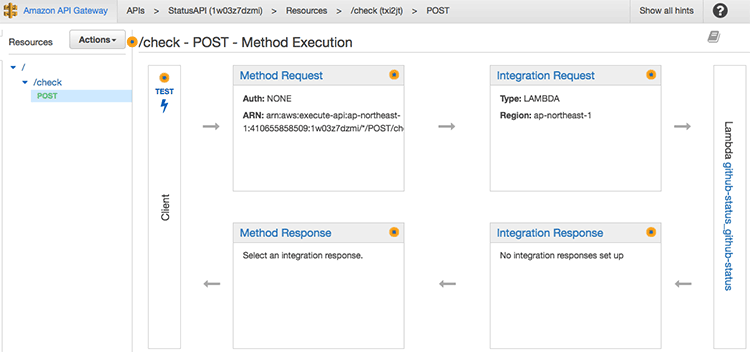
HTTP로 200을 줄 수도 있고 201이나 400, 404등 다양한 응답을 줄 수 있으므로 매핑 조건에 따라 어떤 응답을 줄지를 결정할 수 있다. 좀 더 설명하면 Lambda의 결과를 받아서 상태 코드와 함께 응답 데이터 형식을 결정해서 반환할 수 있다.
여기서는 일단 기본 응답인 200 OK를 추가해 보자.
 1// infrastructure/github-status.tf
 2
 3// 200 응답 매핑
 4resource "aws_api_gateway_method_response" "status_api_resource_check_post_200" {
 5  rest_api_id = "${aws_api_gateway_rest_api.status_api.id}"
 6  resource_id = "${aws_api_gateway_resource.status_api_resource_check.id}"
 7  http_method = "${aws_api_gateway_method.status_api_resource_check_post.http_method}"
 8  status_code = "200"
 9  response_models = {
10    "application/json" = "Empty"
11  }
12}
13
14resource "aws_api_gateway_integration_response" "status_api_resource_check_post_200" {
15  rest_api_id = "${aws_api_gateway_rest_api.status_api.id}"
16  resource_id = "${aws_api_gateway_resource.status_api_resource_check.id}"
17  http_method = "${aws_api_gateway_method.status_api_resource_check_post.http_method}"
18  status_code = "${aws_api_gateway_method_response.status_api_resource_check_post_200.status_code}"
19
20  response_templates = {
21    "application/json" = ""
22  }
23}
일단 aws_api_gateway_method_response로 메서드의 응답을 하나 정의해야 한다. 여기서는 상태 코드를 200으로 정의했고 응답의 모델은 기본으로 만들어지는 Empty 모델을 application/json으로 응답하도록 정의했다. aws_api_gateway_integration_response에서는 Lambda와 응답을 통합하는 역할을 하는데 여기서 application/json 형식으로 응답하도록 정의했고 그 내용에는 아무것도 넣지 않았다.
 1$ apex infra plan
 2
 3-/+ aws_api_gateway_deployment.status_api_test
 4    created_date:      "2017-05-07T17:59:46Z" => "<computed>"
 5    description:       "Deployed at 2017-05-07T17:59:45Z" => "Deployed at 2017-05-07T18:00:01Z"
 6    execution_arn:     "arn:aws:execute-api:ap-northeast-1:410000000000:1w03z7dzmi/test" => "<computed>"
 7    invoke_url:        "https://1w03z7dzmi.execute-api.ap-northeast-1.amazonaws.com/test" => "<computed>"
 8    rest_api_id:       "1w03z7dzmi" => "1w03z7dzmi"
 9    stage_description: "2017-05-07T17:59:45Z" => "2017-05-07T18:00:01Z" (forces new resource)
10    stage_name:        "test" => "test"
11
12+ aws_api_gateway_integration_response.status_api_resource_check_post_200
13    http_method:                         "POST"
14    resource_id:                         "txi2jt"
15    response_templates.%:                "1"
16    response_templates.application/json: ""
17    rest_api_id:                         "1w03z7dzmi"
18    status_code:                         "200"
19
20+ aws_api_gateway_method_response.status_api_resource_check_post_200
21    http_method:                      "POST"
22    resource_id:                      "txi2jt"
23    response_models.%:                "1"
24    response_models.application/json: "Empty"
25    rest_api_id:                      "1w03z7dzmi"
26    status_code:                      "200"
27
28
29Plan: 3 to add, 0 to change, 1 to destroy.
이를 적용한 뒤에 API를 다시 테스트하면 Lambda가 반환하는 결과가 200 OK로 반환된 것을 확인할 수 있다.
 1$ curl -i \
 2  -X POST https://1w03z7dzmi.execute-api.ap-northeast-1.amazonaws.com/test/check \
 3  -d '{ "url": "https://status.github.com/api/last-message.json"}'
 4HTTP/1.1 200 OK
 5Content-Type: application/json
 6Content-Length: 107
 7Connection: keep-alive
 8Date: Sun, 07 May 2017 18:04:37 GMT
 9x-amzn-RequestId: a1f41398-334f-11e7-b887-d166a220b6ab
10X-Amzn-Trace-Id: sampled=0;root=1-590f61b5-8338679ddbc8cf6feeadade5
11X-Cache: Miss from cloudfront
12Via: 1.1 5d1ba4039f11e793a35923f543e4f02a.cloudfront.net (CloudFront)
13X-Amz-Cf-Id: Q4kIiAq7w8GK3SVVm3fmSmf3qzNlSZ-bsBElSl8rYzT7mGJi-HZXaA==
14
15"{\"status\":\"good\",\"body\":\"Everything operating normally.\",\"created_on\":\"2017-05-06T19:04:12Z\"}"
이제 정상적인 동작은 마무리되었다. 이 API에 인증은 추가하지 않았지만, 이는 여기서는 다루지 않는다.
예외 응답 추가
200 OK는 잘 반환하게 되었는데 HTTP API라면 요청 형식이 잘못되거나 Lambda에서 오류가 발생한 경우 4xx, 5xx 응답을 줄 수 있어야 한다. 이를 위해서 200 응답처럼 응답 매핑을 추가해야 한다.
 1// infrastructure/github-status.tf
 2
 3// 400 응답 매핑
 4resource "aws_api_gateway_method_response" "status_api_resource_check_post_400" {
 5  rest_api_id = "${aws_api_gateway_rest_api.status_api.id}"
 6  resource_id = "${aws_api_gateway_resource.status_api_resource_check.id}"
 7  http_method = "${aws_api_gateway_method.status_api_resource_check_post.http_method}"
 8  status_code = "400"
 9  response_models = {
10    "application/json" = "Error"
11  }
12}
13
14resource "aws_api_gateway_integration_response" "status_api_resource_check_post_400" {
15  rest_api_id = "${aws_api_gateway_rest_api.status_api.id}"
16  resource_id = "${aws_api_gateway_resource.status_api_resource_check.id}"
17  http_method = "${aws_api_gateway_method.status_api_resource_check_post.http_method}"
18  status_code = "${aws_api_gateway_method_response.status_api_resource_check_post_400.status_code}"
19  selection_pattern = ".*BadRequest.*"
20  response_templates = {
21    "application/json" = <<EOF
22#set ($errorMessageObj = $util.parseJson($input.path('$.errorMessage')))
23
24{
25  "message": "$errorMessageObj.message",
26  "stack": "$errorMessageObj.stackTrace",
27  "requestId": "$errorMessageObj.requestId"
28}
29EOF
30  }
31}
32
33// 500 응답 매핑
34resource "aws_api_gateway_method_response" "status_api_resource_check_post_500" {
35  rest_api_id = "${aws_api_gateway_rest_api.status_api.id}"
36  resource_id = "${aws_api_gateway_resource.status_api_resource_check.id}"
37  http_method = "${aws_api_gateway_method.status_api_resource_check_post.http_method}"
38  status_code = "500"
39  response_models = {
40    "application/json" = "Error"
41  }
42}
43
44resource "aws_api_gateway_integration_response" "status_api_resource_check_post_500" {
45  rest_api_id = "${aws_api_gateway_rest_api.status_api.id}"
46  resource_id = "${aws_api_gateway_resource.status_api_resource_check.id}"
47  http_method = "${aws_api_gateway_method.status_api_resource_check_post.http_method}"
48  status_code = "${aws_api_gateway_method_response.status_api_resource_check_post_500.status_code}"
49  selection_pattern = ".*InternalServerError.*"
50  response_templates = {
51    "application/json" = <<EOF
52#set ($errorMessageObj = $util.parseJson($input.path('$.errorMessage')))
53
54{
55  "message": "$errorMessageObj.message",
56  "stack": "$errorMessageObj.stackTrace",
57  "requestId": "$errorMessageObj.requestId"
58}
59EOF
60  }
61}
앞에 200과 같이 400, 500 용으로 aws_api_gateway_method_response와 aws_api_gateway_integration_response를 선언했다. 200과 다른 부분은 selection_pattern = ".*\BadRequest\]*"부분인데 이는 Lambda에서 넘어온 응답의 패턴을 정규식으로 비교해서 매치되는 경우 기본 응답 대신 이 응답을 사용한다. 앞에 Lambda에서 요청 오류이면 [BadRequest]를, 다른 오류가 생기면 [InternalServerError] 오류 메시지에 추가한 것을 기억하는가? 여기서 이 메시지를 비교한 것이다. 앞에서도 설명했듯이 오류 객체 JSON을 문자열로 반환했으므로 전체가 문자열로 받게 되는데 여기서 정규식으로 원하는 부분을 비교해서 응답과 매칭시키면 된다.
response_templates에서는 application/json로 반환하는데 받은 객체를 그대로 주는 대신 응답 데이터를 구성했다. API Gateway에서 제공하는 유틸리티 함수가 있는데 $util.parseJson($input.path('$.errorMessage'))에서 Lambda에서 받은 $.errorMessage를 JSON으로 변환해서 $errorMessageObj로 할당했다. 그리고 이 객체를 이용해서 원하는 JSON을 새로 구성해서 응답하도록 설정했다.
 1$ apex infra plan
 2
 3-/+ aws_api_gateway_deployment.status_api_test
 4    created_date:      "2017-05-07T18:00:26Z" => "<computed>"
 5    description:       "Deployed at 2017-05-07T18:00:25Z" => "Deployed at 2017-05-07T18:16:54Z"
 6    execution_arn:     "arn:aws:execute-api:ap-northeast-1:410000000000:1w03z7dzmi/test" => "<computed>"
 7    invoke_url:        "https://1w03z7dzmi.execute-api.ap-northeast-1.amazonaws.com/test" => "<computed>"
 8    rest_api_id:       "1w03z7dzmi" => "1w03z7dzmi"
 9    stage_description: "2017-05-07T18:00:25Z" => "2017-05-07T18:16:54Z" (forces new resource)
10    stage_name:        "test" => "test"
11
12+ aws_api_gateway_integration_response.status_api_resource_check_post_400
13    http_method:                         "POST"
14    resource_id:                         "txi2jt"
15    response_templates.%:                "1"
16    response_templates.application/json: "#set ($errorMessageObj = $util.parseJson($input.path('$.errorMessage')))\n\n{\n  \"message\": \"$errorMessageObj.message\",\n  \"stack\": \"$errorMessageObj.stackTrace\",\n  \"requestId\": \"$errorMessageObj.requestId\"\n}\n"
17    rest_api_id:                         "1w03z7dzmi"
18    selection_pattern:                   ".*BadRequest.*"
19    status_code:                         "400"
20
21+ aws_api_gateway_integration_response.status_api_resource_check_post_500
22    http_method:                         "POST"
23    resource_id:                         "txi2jt"
24    response_templates.%:                "1"
25    response_templates.application/json: "#set ($errorMessageObj = $util.parseJson($input.path('$.errorMessage')))\n\n{\n  \"message\": \"$errorMessageObj.message\",\n  \"stack\": \"$errorMessageObj.stackTrace\",\n  \"requestId\": \"$errorMessageObj.requestId\"\n}\n"
26    rest_api_id:                         "1w03z7dzmi"
27    selection_pattern:                   ".*InternalServerError.*"
28    status_code:                         "500"
29
30+ aws_api_gateway_method_response.status_api_resource_check_post_400
31    http_method:                      "POST"
32    resource_id:                      "txi2jt"
33    response_models.%:                "1"
34    response_models.application/json: "Error"
35    rest_api_id:                      "1w03z7dzmi"
36    status_code:                      "400"
37
38+ aws_api_gateway_method_response.status_api_resource_check_post_500
39    http_method:                      "POST"
40    resource_id:                      "txi2jt"
41    response_models.%:                "1"
42    response_models.application/json: "Error"
43    rest_api_id:                      "1w03z7dzmi"
44    status_code:                      "500"
45
46+ aws_api_gateway_method_settings.status_api_resource_check_post
47    method_path:                "check/POST"
48    rest_api_id:                "1w03z7dzmi"
49    settings.#:                 "1"
50    settings.0.logging_level:   "INFO"
51    settings.0.metrics_enabled: "true"
52    stage_name:                 "test"
53
54
55Plan: 6 to add, 0 to change, 1 to destroy.
이를 적용하고 실제로 각 오류를 테스트해보자.
 1$ curl -i \
 2  -X POST https://1w03z7dzmi.execute-api.ap-northeast-1.amazonaws.com/test/check \
 3  -d '{ }'
 4HTTP/1.1 400 Bad Request
 5Content-Type: application/json
 6Content-Length: 234
 7Connection: keep-alive
 8Date: Sun, 07 May 2017 18:17:57 GMT
 9x-amzn-RequestId: 7ef3703e-3351-11e7-9007-39d9f5af8bce
10X-Amzn-Trace-Id: sampled=0;root=1-590f64d5-c36878c3f02a3717ec66c3d3
11X-Cache: Error from cloudfront
12Via: 1.1 e16834aaac4fd814ae3edf9e633f4567.cloudfront.net (CloudFront)
13X-Amz-Cf-Id: GrkJP5YTUc1LfwQO6Sc4cimOzKVFFAXDfj3_chP7_PHCpJDjYyQBmw==
14
15
16{
17  "message": "[BadRequest] URL required",
18  "stack": "Error: [BadRequest] URL required
19    at ping (/var/task/index.js:6:25)
20    at exports.handle (/var/task/index.js:18:3)",
21  "requestId": "7ef40ba9-3351-11e7-b596-5dd2f1ad2723"
22}
요청에 url 속성을 전달하지 않으면 400 Bad Request가 반환된다.
 1$ curl -i \
 2  -X POST https://1w03z7dzmi.execute-api.ap-northeast-1.amazonaws.com/test/check \
 3  -d '{ "url": "noturl" }'
 4HTTP/1.1 500 Internal Server Error
 5Content-Type: application/json
 6Content-Length: 448
 7Connection: keep-alive
 8Date: Sun, 07 May 2017 18:18:12 GMT
 9x-amzn-RequestId: 87efd9cd-3351-11e7-8a79-7fd16e045aa1
10X-Amzn-Trace-Id: sampled=0;root=1-590f64e4-033e3c311bef8a2e208d0a5f
11X-Cache: Error from cloudfront
12Via: 1.1 11a0261328fa2fb9ebe64a59fd132104.cloudfront.net (CloudFront)
13X-Amz-Cf-Id: rt2k9xQFGIxKQB1z4wuapWD5gasgBsR05V9APGlTLEyRGHlTs5Nh_g==
14
15
16{
17  "message": "[InternalServerError] Invalid URI "noturl"",
18  "stack": "Error: Invalid URI "noturl"
19    at Request.init (/var/task/node_modules/request/request.js:276:31)
20    at new Request (/var/task/node_modules/request/request.js:130:8)
21    at request (/var/task/node_modules/request/index.js:54:10)
22    at ping (/var/task/index.js:8:3)
23    at exports.handle (/var/task/index.js:18:3)",
24  "requestId": "87ef8bdc-3351-11e7-82ab-d92b9a17bfda"
25}
그리고 다른 오류가 발생하도록 url이 아닌 다른 문자열을 전달하자 500 오류가 정상적으로 반환되었다.
마무리
물론 API Gateway가 많은 기능을 제공하므로 제대로 사용하려면 이외에도 많은 설정이 필요하지만, 이 기본 골격과 각 리소스에 대한 이해를 하기 위해서 꽤 많은 시간을 소비했다. 이 구성이 가장 좋은 구성이라는 것은 아니지만, 이 기본 구조를 찬찬히 살펴보면 각 리소스를 정의해서 사용하는 방법을 이해할 수 있다고 생각한다. 물론 API Gateway도 Terraform도 계속 발전하고 있으므로 변경사항에 대한 추적도 필요하긴 하다.
다음은 infrastructure/github-status.tf 파일의 전체 내용이다.
  1// API 정의
  2resource "aws_api_gateway_rest_api" "status_api" {
  3  name        = "StatusAPI"
  4  description = "상태를 조회하는 API"
  5}
  6
  7// API 리소스 정의 (/check 같은 경로)
  8resource "aws_api_gateway_resource" "status_api_resource_check" {
  9  rest_api_id = "${aws_api_gateway_rest_api.status_api.id}"
 10  parent_id   = "${aws_api_gateway_rest_api.status_api.root_resource_id}"
 11  path_part   = "check"
 12}
 13
 14// API 리소스의 메서드 정의 (GET, POST 등)
 15resource "aws_api_gateway_method" "status_api_resource_check_post" {
 16  rest_api_id   = "${aws_api_gateway_rest_api.status_api.id}"
 17  resource_id   = "${aws_api_gateway_resource.status_api_resource_check.id}"
 18  http_method   = "POST"
 19  authorization = "NONE"
 20}
 21
 22// API와 Lambda 통합
 23resource "aws_api_gateway_integration" "status_api_resource_check_post" {
 24  rest_api_id = "${aws_api_gateway_rest_api.status_api.id}"
 25  resource_id = "${aws_api_gateway_resource.status_api_resource_check.id}"
 26  http_method = "${aws_api_gateway_method.status_api_resource_check_post.http_method}"
 27  type = "AWS"
 28  integration_http_method = "POST"
 29  uri = "arn:aws:apigateway:${var.aws_region}:lambda:path/2015-03-31/functions/${var.apex_function_github-status}/invocations"
 30}
 31
 32// API 배포
 33resource "aws_api_gateway_deployment" "status_api_test" {
 34  depends_on = ["aws_api_gateway_integration.status_api_resource_check_post"]
 35  rest_api_id = "${aws_api_gateway_rest_api.status_api.id}"
 36  stage_name  = "test"
 37  stage_description = "${timestamp()}"
 38  description = "Deployed at ${timestamp()}"
 39}
 40
 41// Lambda에 호출할 권리
 42resource "aws_lambda_permission" "status_api_resource_check_post" {
 43  statement_id = "AllowInvokeFromAPIGateway"
 44  action = "lambda:InvokeFunction"
 45  function_name = "${var.apex_function_github-status_name}"
 46  principal = "apigateway.amazonaws.com"
 47  source_arn = "${aws_api_gateway_deployment.status_api_test.execution_arn}/${aws_api_gateway_integration.status_api_resource_check_post.integration_http_method}${aws_api_gateway_resource.status_api_resource_check.path}"
 48}
 49
 50// API 메서드 설정
 51resource "aws_api_gateway_method_settings" "status_api_resource_check_post" {
 52  rest_api_id = "${aws_api_gateway_rest_api.status_api.id}"
 53  stage_name  = "${aws_api_gateway_deployment.status_api_test.stage_name}"
 54  method_path = "${aws_api_gateway_resource.status_api_resource_check.path_part}/${aws_api_gateway_method.status_api_resource_check_post.http_method}"
 55
 56  settings {
 57    metrics_enabled = true
 58    logging_level = "INFO"
 59  }
 60}
 61
 62// 200 응답 매핑
 63resource "aws_api_gateway_method_response" "status_api_resource_check_post_200" {
 64  rest_api_id = "${aws_api_gateway_rest_api.status_api.id}"
 65  resource_id = "${aws_api_gateway_resource.status_api_resource_check.id}"
 66  http_method = "${aws_api_gateway_method.status_api_resource_check_post.http_method}"
 67  status_code = "200"
 68  response_models = {
 69    "application/json" = "Empty"
 70  }
 71}
 72
 73resource "aws_api_gateway_integration_response" "status_api_resource_check_post_200" {
 74  rest_api_id = "${aws_api_gateway_rest_api.status_api.id}"
 75  resource_id = "${aws_api_gateway_resource.status_api_resource_check.id}"
 76  http_method = "${aws_api_gateway_method.status_api_resource_check_post.http_method}"
 77  status_code = "${aws_api_gateway_method_response.status_api_resource_check_post_200.status_code}"
 78
 79  response_templates = {
 80    "application/json" = ""
 81  }
 82}
 83
 84// 400 응답 매핑
 85resource "aws_api_gateway_method_response" "status_api_resource_check_post_400" {
 86  rest_api_id = "${aws_api_gateway_rest_api.status_api.id}"
 87  resource_id = "${aws_api_gateway_resource.status_api_resource_check.id}"
 88  http_method = "${aws_api_gateway_method.status_api_resource_check_post.http_method}"
 89  status_code = "400"
 90  response_models = {
 91    "application/json" = "Error"
 92  }
 93}
 94
 95resource "aws_api_gateway_integration_response" "status_api_resource_check_post_400" {
 96  rest_api_id = "${aws_api_gateway_rest_api.status_api.id}"
 97  resource_id = "${aws_api_gateway_resource.status_api_resource_check.id}"
 98  http_method = "${aws_api_gateway_method.status_api_resource_check_post.http_method}"
 99  status_code = "${aws_api_gateway_method_response.status_api_resource_check_post_400.status_code}"
100  selection_pattern = ".*BadRequest.*"
101  response_templates = {
102    "application/json" = <<EOF
103#set ($errorMessageObj = $util.parseJson($input.path('$.errorMessage')))
104
105{
106  "message": "$errorMessageObj.message",
107  "stack": "$errorMessageObj.stackTrace",
108  "requestId": "$errorMessageObj.requestId"
109}
110EOF
111  }
112}
113
114// 500 응답 매핑
115resource "aws_api_gateway_method_response" "status_api_resource_check_post_500" {
116  rest_api_id = "${aws_api_gateway_rest_api.status_api.id}"
117  resource_id = "${aws_api_gateway_resource.status_api_resource_check.id}"
118  http_method = "${aws_api_gateway_method.status_api_resource_check_post.http_method}"
119  status_code = "500"
120  response_models = {
121    "application/json" = "Error"
122  }
123}
124
125resource "aws_api_gateway_integration_response" "status_api_resource_check_post_500" {
126  rest_api_id = "${aws_api_gateway_rest_api.status_api.id}"
127  resource_id = "${aws_api_gateway_resource.status_api_resource_check.id}"
128  http_method = "${aws_api_gateway_method.status_api_resource_check_post.http_method}"
129  status_code = "${aws_api_gateway_method_response.status_api_resource_check_post_500.status_code}"
130  selection_pattern = ".*InternalServerError.*"
131  response_templates = {
132    "application/json" = <<EOF
133#set ($errorMessageObj = $util.parseJson($input.path('$.errorMessage')))
134
135{
136  "message": "$errorMessageObj.message",
137  "stack": "$errorMessageObj.stackTrace",
138  "requestId": "$errorMessageObj.requestId"
139}
140EOF
141  }
142}


저도 apex사용하면서 terraform도 같이 설정해서 배포하고 관리하는 것에 대해서 학습을 하고 있는 중인데 정훈님이 올려 주신 글이 도움이 많이 되네요. 감사합니다~.
잘 지내시죠? ㅎㅎ Terraform은 완전히 다른 도구라서 apex만 처음 쓸때 어렵긴 하더라고요.